Windows
Windows x64 · preview installer.
Download Windows installer
BUSINESS TOOLS · PERSONAL FINANCE · WHAT’S NEXT
Explore checkout, inventory, your team, customers and reports in one interactive business demo—alongside tools for your personal income and expenses.
Explore before you subscribe. Business operations are demo previews; real plan availability is explained below.
DESKTOP PREVIEW
Native Windows and Mac installers open the online KeeperBMA website in a dedicated app window. Internet is required. Business tools remain temporary demos; real staff authentication and device synchronization are not connected.
Windows x64 · preview installer.
Download Windows installermacOS 13+ · Intel and Apple silicon.
Download Mac installerOpen KeeperBMA in your browser. Touch menus work in the business demo.
Explore the POS demoUnsigned preview builds may show operating-system warnings. Review the release notes before installing. Desktop updates currently require downloading a new installer.
WATCH IT HERE
Actual demo screens with friendly female narration, gentle background music, and captions. Press play to hear the walkthrough.
FULL WALKTHROUGH
Overview → products → cashier checkout → receipts → staff schedules → time tracking → loyalty → accounting → marketing → personal reports.
Download walkthrough MP4SHORT & SHAREABLE
A narrated vertical version with background music for WhatsApp, Reels, Shorts and other social channels. Nothing is posted automatically.
Download vertical MP4THE BUSINESS WORKSPACE
These connected workflows are available to explore with fictional data in the public demo. They are not yet live business operations.
Build a catalog with product photos, descriptions, prices, brands, categories and CSV imports. Receive supplier purchases and watch stock update.
Keep each branch’s team, shifts and time records together. Assign one shift to several staff and review planned hours.
Keep contacts, referral sources, notes and follow-up tasks together. Preview optional phone membership and customer purchase history.
Connect sample sales, discounts, product costs and expenses in a profit-and-loss overview and activity ledger.
Plan campaigns and record spend, leads, orders and attributed revenue. Keep meeting agendas, assigned tasks and customer follow-ups visible.
Try business profile and employee-access screens, switch between light and dark themes, and ask Omar about features, prices and demo steps.
BUILT AROUND YOUR WORK
Explore the path from supplier delivery to product stock, checkout, receipts and repeat-customer rewards.
Try branch staff schedules, time records, meetings and follow-ups. Booking and service-specific workflows are not included yet.
Organize income sources, expenses and monthly net income, while exploring the business tools as your work grows.
FUTURE PROJECTS
A direction for development, not a delivery promise. These capabilities are not unlocked by a demo or guaranteed by subscribing.
Persistent POS, inventory and branch data, secure individual staff accounts, server-side permissions and auditable transactions.
Verified phone membership, secure customer access and consent-based messaging through a production provider. Delivery, security and provider setup still need implementation.
Complete bookkeeping and more comprehensive payroll and tax integrations need additional design, jurisdiction-specific support and professional review.
Public business pages, website publishing, expanded management tools, AI business analysis and image optimization remain planned features.
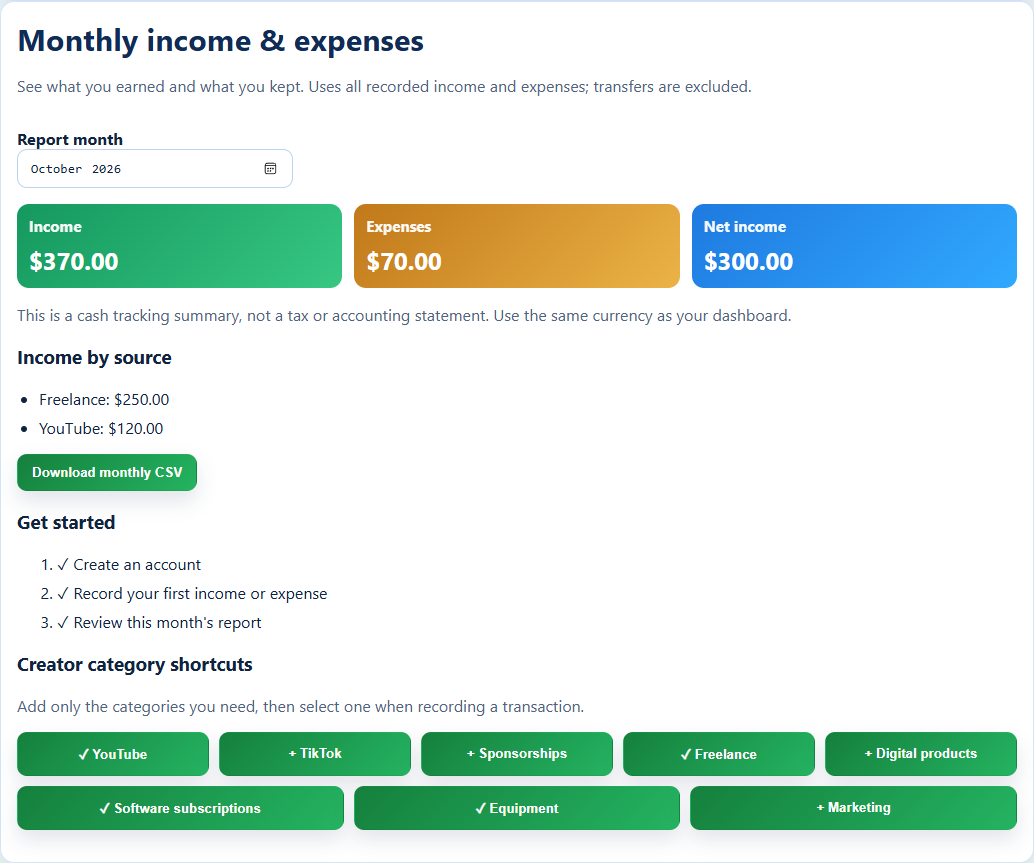
Add income, expenses, accounts, and notes manually with full control.
Eligible plans can connect supported banks through Plaid. Availability depends on your bank and connection.
Compare recorded income and expenses for any month. Transfers stay out of your totals.
Review income by source and download a monthly CSV for your records.
Choose a plan to continue to Sign Up.
Demo previews are not a promise of paid-plan availability. Review the current feature descriptions and final checkout before subscribing.
$2 / month
Manual accounts, income and expense tracking, monthly report, and CSV export.
$7 / month
Everything in Basic, plus supported bank connections through Plaid.
$25 / month
Business profile and employee records. Public pages, website publishing, POS, and inventory workflows are planned.
$50 / month
Business profile and employee records. AI business tools and image optimization are planned, not available yet.
$70 / month
Business profile and employee records. The expanded website bundle and deeper management tools are planned.
The walkthrough uses fictional data. Signed-in business device tools support individual staff IDs, authorized registers, cash sales, shared kitchen tickets and time-clock records. Card processing, SMS, complete bookkeeping, payroll processing, tax filing and website publishing are not connected.
KeeperBMA brings personal finance and a growing business workspace together. Start with the available finance tools, explore the business demo, and help shape the next stage.